SMTP servers
Choosing an SMTP server for bulk email
Ultra Email sends through an SMTP server you choose. You have two kinds of option, and many people use both.
1. Mailboxes you already have
Free to start, and fine for small lists. The limit is the provider's daily cap, not Ultra Email.
Gmail / Google Workspace
Your own mailbox
- Good for:
- Small lists and getting started. You already have it and replies land in a normal inbox.
- Watch out for:
- Daily caps: roughly 500 recipients a day on personal Gmail and about 2,000 on Workspace. Google can pause an account that sends spam-like mail. You need an app password.
Outlook.com and Microsoft 365
Your own mailbox
- Good for:
- Businesses that already live in Microsoft 365.
- Watch out for:
- Microsoft is moving personal accounts away from password-based SMTP, and business admins must enable Authenticated SMTP. Limits are lower than a relay.
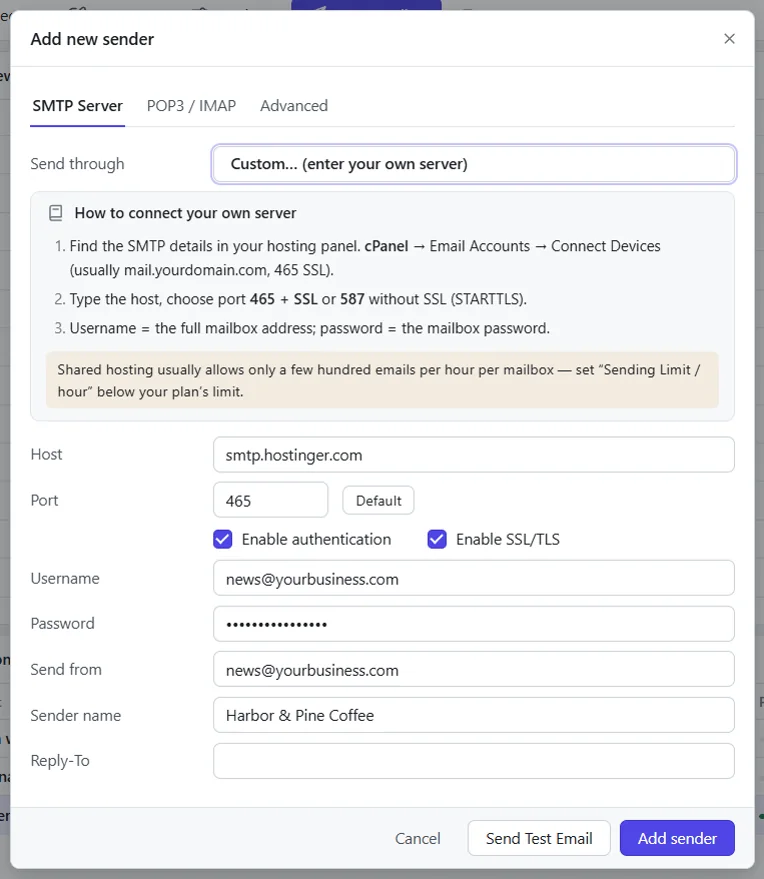
Your domain mailbox (Hostinger, cPanel, GoDaddy)
Your own mailbox
- Good for:
- Sending as you@yourbusiness.com with no extra service.
- Watch out for:
- Shared hosts usually allow only a few hundred emails an hour per mailbox, and some suspend accounts that exceed it. Check your plan's limit.
Your domain mailbox (Hostinger, cPanel, GoDaddy) setup steps
2. Sending services (SMTP relays)
Built for volume, with delivery reports and domain authentication. You pay the provider, not us.
Amazon SES
Sending service
- Good for:
- Large volumes at a low per-email cost, if you are comfortable in the AWS console.
- Watch out for:
- New accounts start in a sandbox until you request production access. You must verify your domain.
SendGrid
Sending service
- Good for:
- A well-known relay with good documentation and domain authentication tools.
- Watch out for:
- Free and entry plans have changed over the years; confirm the current limits before relying on them. The SMTP username is the word apikey.
Brevo (Sendinblue)
Sending service
- Good for:
- Small and medium senders who want a simple SMTP key and a dashboard of delivery events.
- Watch out for:
- Plans are limited by emails per day or month; check what your plan includes.
Brevo (Sendinblue) setup stepsBrevo (Sendinblue) pricing on their site
Mailgun
Sending service
- Good for:
- Developers and teams that want per-domain credentials and EU region support.
- Watch out for:
- Needs a verified domain. Use the EU host if your account is in the EU region.
Mailjet
Sending service
- Good for:
- Teams that want a European provider with a straightforward API key and secret.
- Watch out for:
- Sender addresses and domains must be validated before sending.
Postmark
Sending service
- Good for:
- Transactional email such as receipts and password resets, with a strong reputation for delivery speed.
- Watch out for:
- Built mainly for transactional mail. Check its policy before sending marketing campaigns through it.
SMTP2GO
Sending service
- Good for:
- A simple relay when your host blocks outgoing SMTP ports.
- Watch out for:
- Verify your sender domain and keep to the plan's monthly allowance.
turboSMTP
Sending service
- Good for:
- A relay with a plain SMTP login, if you prefer an alternative to the names above.
- Watch out for:
- Ultra Email has no dedicated preset, so use Custom and enter the host, port and credentials from your turboSMTP dashboard.
We do not quote third-party prices or limits on this page because they change, and a wrong number would cost you money. Each pricing link goes to the provider's own page. Ultra Email is not affiliated with, paid by, or endorsed by any provider listed here, and we earn nothing if you sign up.
How to choose
- Under a few hundred emails a day: your own Gmail or domain mailbox is usually enough. Add a second sender and let Ultra Email rotate between them.
- Thousands per send: use a relay, on your own domain, with SPF, DKIM and DMARC set up. See the setup guides.
- Either way: warm up slowly (20 to 50 emails a day, rising over two to four weeks), keep complaints low and only email people who opted in. Provider terms forbid unsolicited bulk mail, and so does our acceptable use policy.
Related guides and pages
Where to go next: guides, setup steps and the pages people read alongside this one.
- Ultra EmailSMTP Settings for Bulk Email: Gmail, SES, MoreSMTP settings for bulk email from Gmail, Outlook, Microsoft 365, Yahoo, Zoho, Hostinger, cPanel, Amazon SES, SendGrid, Brevo and more, with steps for each.Open
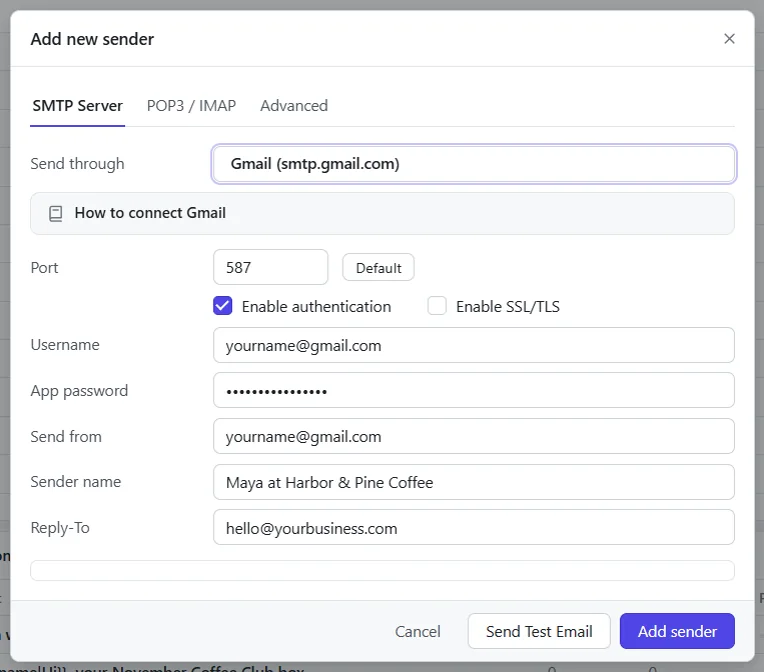
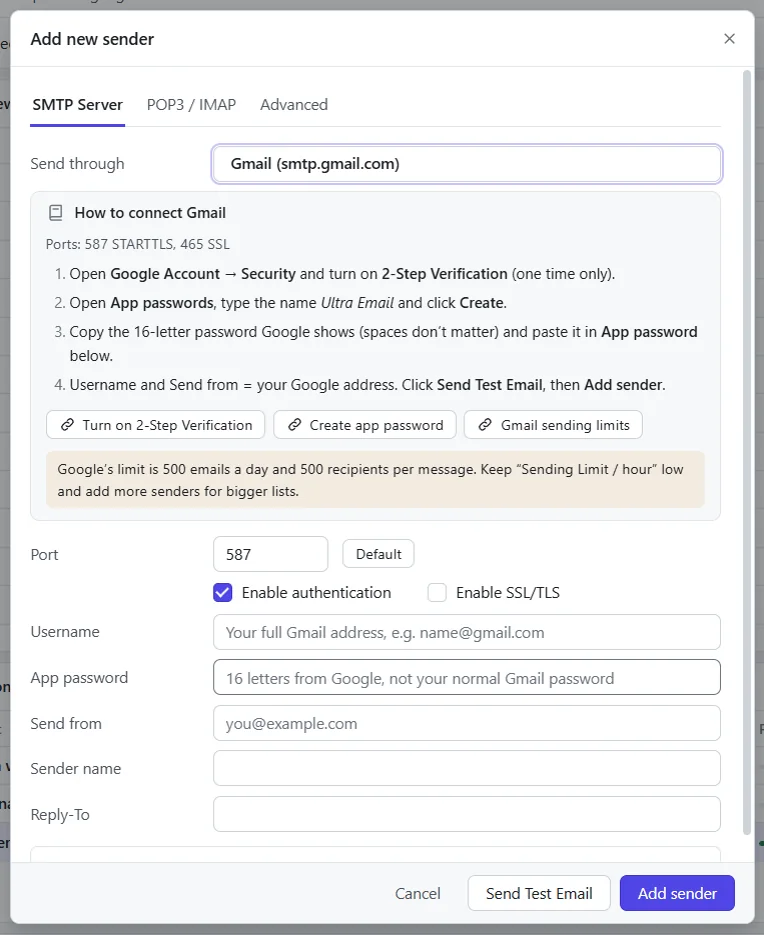
- Ultra Email setupGmail SMTP Settings and Setup for Bulk EmailHost smtp.gmail.com, port 587 with STARTTLS. Where to get the login and how to add Gmail as a sender in Ultra Email, step by step.Open
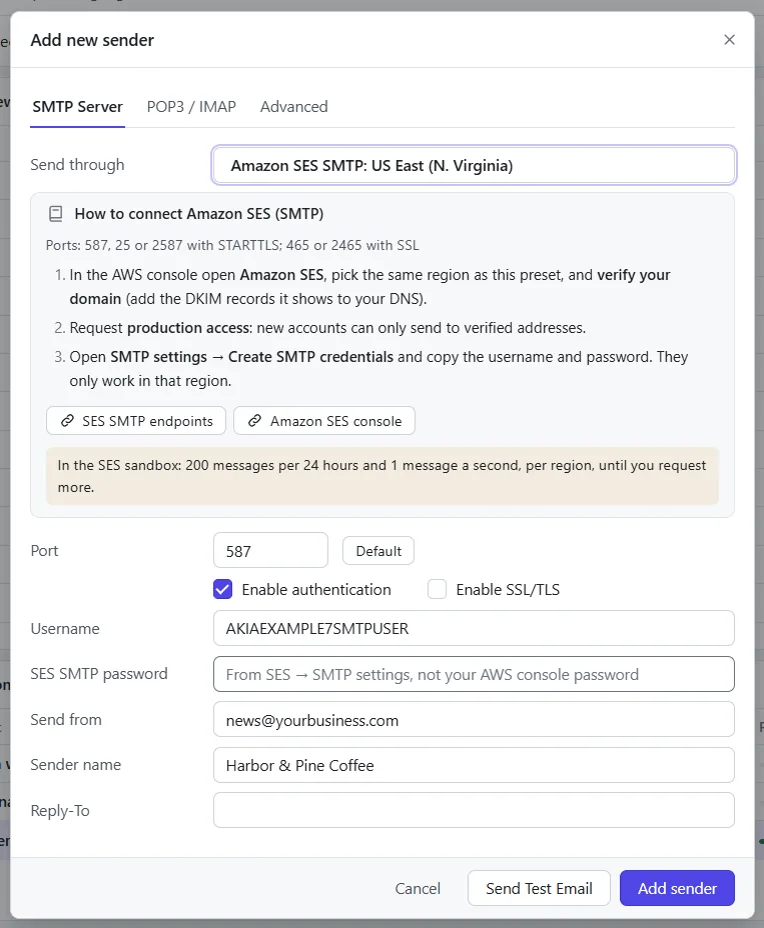
- Ultra Email setupAmazon SES SMTP Settings for Bulk EmailEmail-smtp.<region>.amazonaws.com, port 587, STARTTLS. Getting the login and adding Amazon SES as a sender in Ultra Email.Open
- Ultra Email setupSendGrid SMTP Settings for Bulk EmailHost smtp.sendgrid.net, port 587 with STARTTLS. Where to get the login and how to add SendGrid as a sender in Ultra Email, step by step.Open
- Ultra Email manualSPF DKIM DMARC Setup to Reach the InboxSPF DKIM DMARC setup for bulk senders, and other ways to reach the inbox: warming up new senders, cleaning your list and keeping complaints low.Open
- Ultra EmailBulk Email Software Price: From $79 a YearUltra Email is from $79 a year, $29 a month or $199 once, for 1, 3 or 10 devices, with a 15-day refund. Try it free first.Open